Floating player
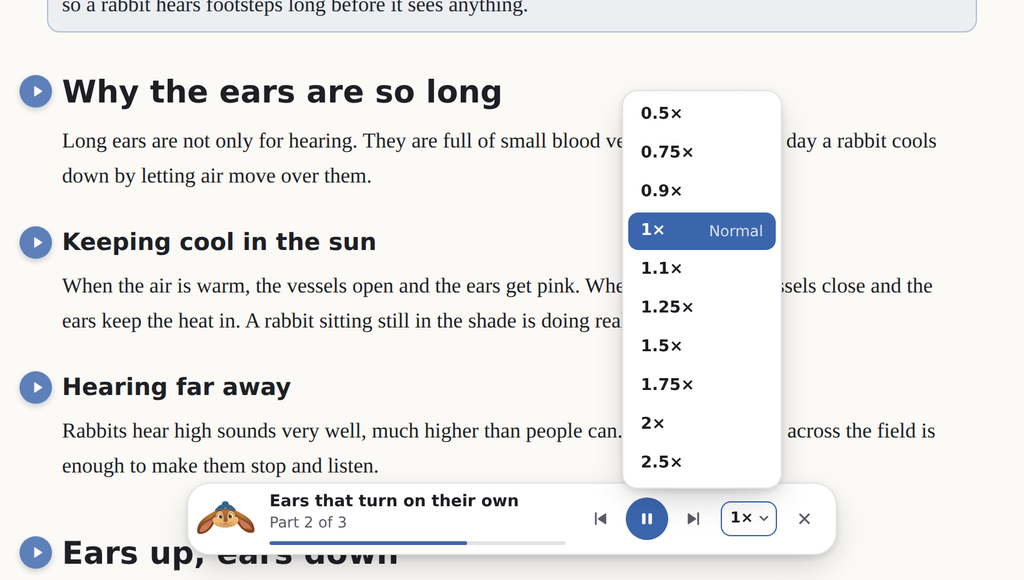
While EarsUp reads, a small player sits at the bottom of the page. It shows the heading being read, how far along it is, and the controls.

Controls
| Control | What it does |
|---|---|
| Go back one part | |
| / | Pause or resume |
| Skip to the next part | |
| 1× | Choose the reading speed |
| Stop reading and close the player |
A "part" is about one or two sentences. Long sections are read in parts so speech does not cut out.
Every control has a tooltip. Point at it to see what it does.
Speed
Click the speed button to open the list: 0.5×, 0.75×, 0.9×, 1×, 1.1×, 1.25×, 1.5×, 1.75×, 2×, 2.5×. You can use the arrow keys and Enter in the list, and Esc closes it.
The speed you choose here is saved. It is the same setting as Voices → Playback → Speed.
Move it
Drag the player anywhere on the page. EarsUp remembers the spot for next time. Double-click the player to put it back at the bottom centre.
Turn it off
If you only want the play buttons, turn off General → Reading → Floating player. You can still pause and stop with the keys.